Here’s a question that sounds simple: how much profit did your agency make on its last website project?
If you can answer in under a minute, with a figure that includes the hours your team really spent, you’re in a small minority. For most agency owners, the answer is a feeling. The client paid. The work shipped. Everyone seemed happy. Whether the project made money, or quietly lost it in revisions and calls, is a question that gets answered months later, if ever, when cash feels tight and nobody can say why.
That gap is exactly why we built a calculator and put it on our homepage. It’s a free tool, it takes about two minutes and it answers one question: what happens to your profit if the same project is delivered a different way?
If you’ve been searching for an agency profit margin calculator free to use, with no sign-up wall, no email gate and no sales call attached, this guide explains what ours does, what it asks for, how to read the results and, just as important, where its limits are. We’re Wordout Media, a white label partner for agencies, so the calculator compares your internal delivery with outsourced delivery at our $10 an hour rate. We’ll be upfront about that bias as we go.
What Is the Wordout Media Agency Profit Margin Calculator?
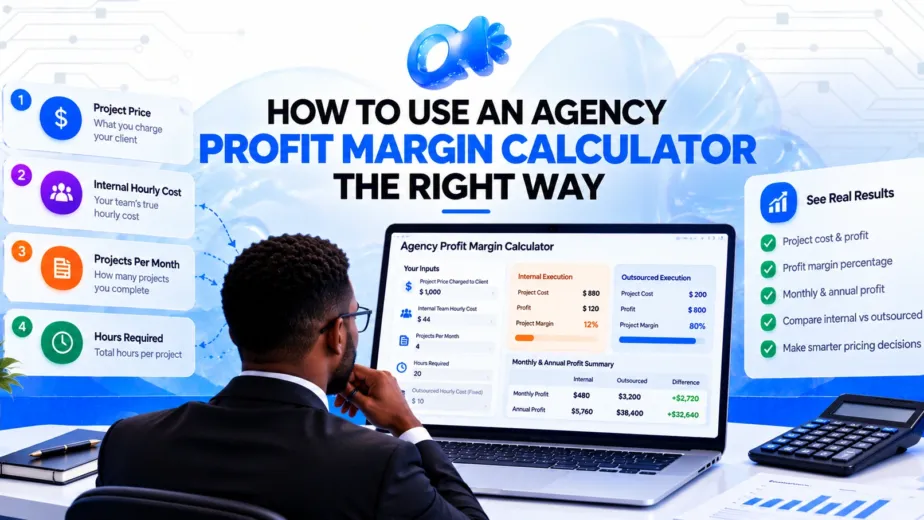
It’s a simple comparison tool. You can try our profit margin calculator. You enter a few numbers about one typical project, and it shows you two columns side by side:
- Internal execution: what the project costs and earns when your own team does the work.
- Outsourced execution: what the same project costs and earns when the production is done by a partner at $10 an hour.
It then rolls those project figures up into a monthly and annual summary, so you can see what the difference is worth over time rather than on a single job.
It isn’t a full accounting package, and it doesn’t pretend to be. It’s a quick, honest way to see whether the economics of outsourcing deserve a closer look for your agency.
What the Calculator Asks For
There are five inputs. Here’s what each one means and where to find it.
1. Project Price Charged to Client
What the client pays you for the project. If you’re working with a monthly retainer, use one month’s fee. Use the real figure after any discounts, not your rate card.
2. Internal Team Hourly Cost
What an hour of your own team’s time costs you. This is the number people most often get wrong. It’s not just the hourly wage. A realistic figure includes payroll taxes, benefits, software, equipment and the fact that nobody is productive for every paid hour. If you pay someone $55,000 a year, the true cost per productive hour is usually well above the $26 you’d get from dividing by 2,080.
3. Projects Per Month
How many projects of this type you complete in a typical month. This is what turns a one-off result into a monthly and annual figure.
4. Hours Required
How many hours the project takes from start to finish. Include revisions, meetings, project management and reporting, not just production. Most agencies undercount here by a wide margin.
5. Outsourced Hourly Cost
This one is set for you at $10 an hour, which is our rate. It’s the same on every block we sell: 20 hours for $200, 40 hours for $400 or 80 hours for $800.
That’s the whole input list. Four numbers from you, one fixed.
What the Calculator Shows You
Once you’ve entered your numbers, the tool produces three groups of results.
Internal execution
- Project cost
- Profit
- Project margin (%)
Outsourced execution
- Project cost
- Profit
- Project margin (%)
Monthly and annual profit summary
- Monthly internal profit
- Monthly outsourced profit
- Additional monthly profit
- Additional annual profit
The last two lines are the ones most people look at first. They answer the question “so what’s this worth?” in plain dollars.
A Quick Example You Can Follow Along With
Numbers make this clearer, so let’s run one through. These figures are illustrative. Use your own when you try the tool.
Your inputs:
- Project price charged to client: $2,500
- Internal team hourly cost: $35
- Projects per month: 4
- Hours required: 40
- Outsourced hourly cost: $10 (fixed)
Internal execution:
- Project cost = 40 hours × $35 = $1,400
- Profit = $2,500 − $1,400 = $1,100
- Margin = $1,100 ÷ $2,500 = 44%
Outsourced execution:
- Project cost = 40 hours × $10 = $400
- Profit = $2,500 − $400 = $2,100
- Margin = $2,100 ÷ $2,500 = 84%
Monthly and annual summary:
- Monthly internal profit = 4 × $1,100 = $4,400
- Monthly outsourced profit = 4 × $2,100 = $8,400
- Additional monthly profit = $4,000
- Additional annual profit = $48,000
On paper, the same four projects a month produce $48,000 more profit a year. That’s the kind of number that makes people stop and pay attention, so it’s also the kind of number that deserves a careful look before anyone gets excited.
The Part Most Calculators Skip: What the Result Doesn’t Include
An agency profit margin calculator free to use is only valuable if you understand what it leaves out. Ours compares delivery cost. It doesn’t automatically capture the following, and you should think about each one.
Your own management time
If you or an account manager spend five hours briefing and reviewing outsourced work, that’s a cost, and it isn’t in the outsourced column. In the example above, five hours at $35 adds $175 per project, which would trim the outsourced margin from 84% to about 77%. It’s still a big improvement, but it’s a different number. When you read the results, subtract your own review time in your head, or add those hours into the “Hours Required” figure for a more conservative picture.
Revision cycles
Early in any new relationship, work may need extra rounds until your partner learns your standards. Budget for that in the first month or two.
Overheads
The calculator shows project-level, or gross, margin. It doesn’t include rent, software, admin staff, your own salary or taxes. A healthy gross margin doesn’t guarantee a healthy business if overheads are too high.
Whether you’d fill the freed-up time
If outsourcing frees up 160 hours a month of your team’s time, that only becomes extra profit if those people are redeployed on paid work or you reduce cost elsewhere. If they sit idle, the savings are theoretical. This is the most overlooked point of all, and we’d rather you hear it from us than discover it later.
Quality and reliability
A lower rate is only a saving if the work arrives to your standard. A cheap partner who needs constant correction can cost you more in time than they save in money. That’s why we offer a trial, which we’ll come back to below.
None of these points undermine the tool. They just mean the output is a starting point for a decision, not the decision itself.
Who Gets the Most From the Calculator?
In our experience, the tool is most useful for a few kinds of agency.
Agencies with a team that’s stretched thin. If everyone’s busy but profit feels flat, the calculator can show where delivery cost is eating margin. We wrote about that pattern in Why Being Constantly Busy Is Killing Your Agency’s Profit.
Agencies deciding whether to hire. Before you post a job ad, run the numbers. Compare the cost per productive hour of an employee with outsourced hours. We cover that decision in detail in White Label vs. In-House Marketing Team.
Freelancers moving toward an agency model. If you’re booked solid and thinking about adding capacity, the calculator shows what scaling through a partner could do to your margins.
Agencies checking their pricing. Even if you never outsource a thing, entering your real price, hours and hourly cost shows whether a service line is truly profitable.
Agencies that already outsource. If you work with another partner, you can’t change the $10 figure in our tool, but you can use the internal side to benchmark your current margins and the calculation logic to test your own numbers elsewhere.
Step-by-Step: How to Use the Calculator in Two Minutes
If you’d like a deeper walkthrough, we’ve written one in How to Use an Agency Profit Margin Calculator the Right Way. Here’s the short version.
- Go to the agency calculator website.
- Pick one real project. Choose a typical job, not your best or worst.
- Enter the price. Use what the client actually paid.
- Enter your true hourly cost. Be honest, and include overhead.
- Enter projects per month. Use a realistic average.
- Enter total hours. Include revisions, calls and management.
- Read the two columns. Compare internal and outsourced margin.
- Check the annual figure. Treat it as an upper bound, then adjust for your own review time.
- Run it again. Try a second project type, such as a retainer.
Run it for two or three different services. Often the pattern is more revealing than any single result.
What to Do With the Results
You’ve got your numbers. Now what?
If the gap is large
A big difference between internal and outsourced margin doesn’t mean you should hand over everything tomorrow. It means a test is worth running. Choose one repeatable task, such as landing page builds or monthly SEO reporting, and send it to a partner as a trial. Compare cost, quality and the time you spent managing it.
If the gap is small
If your internal cost per hour is already low, or your hours are tight, the benefit may be modest. In that case, focus on other margin levers: raising prices, tightening scope or cutting hours per project with better systems. We explore those in Stop Doing More: Why Smart Agencies Build Systems Instead.
If the internal margin is already negative
If you’re losing money on a service even before management time, you have a pricing or scope problem, not just a delivery-cost problem. Outsourcing may help, but it won’t fix underpricing on its own.
If you’re unsure about your hourly cost
Estimate it conservatively and run the tool twice, once with a low figure and once with a high one. If the answer favors outsourcing in both cases, you can be fairly confident in the direction.
Three Mistakes to Avoid When You Run Your First Numbers
Even with a simple tool, a few habits can skew the answer.
Using your best project. Pick a typical job. A flagship project with a generous budget will make everything look healthier than your average month.
Rounding hours down. If a project “took about 30 hours” but you remember three long calls and two rounds of changes, it probably took 38. Use the higher figure.
Running it once and stopping. The first result is a headline. The second run, with your review time added and the hours pushed up by a quarter, is the one that tells you how fragile or robust the margin is. Our walkthrough, How to Use an Agency Profit Margin Calculator the Right Way, covers those stress tests step by step.
From Calculator to Real Test: The 8-Hour Free Trial
A calculator gives you a projection. A trial gives you evidence.
Our 8-hour free trial lets you send us real work, such as a landing page, a batch of social creative, a technical SEO audit or a Google Ads build. There’s no contract, no card and no sales call required first. You see the output and the working relationship before you spend anything.
When you run the trial, pay attention to four things:
- Quality: Would you put your logo on it?
- Speed: Most design, ad setup and video editing tasks come back the same day to 48 hours. Did yours?
- Communication: How clear and responsive was your account manager?
- Management time: How many hours did you spend briefing and reviewing?
Those four answers, combined with your calculator results, give you a much stronger basis for a decision than any sales pitch, ours included.
Frequently Asked Questions
Is the agency profit margin calculator really free?
Yes. It’s on our homepage and doesn’t require registration or payment.
What does the calculator measure?
It compares project cost, profit and margin for internal delivery and outsourced delivery at $10 an hour, then summarizes the difference per month and per year.
Does it include my own review and management time?
Not automatically. For a more realistic picture, add those hours to the “Hours Required” figure or subtract the cost from the outsourced result yourself.
What counts as my internal hourly cost?
It should include salary, employer costs such as taxes and benefits, software, equipment and a realistic allowance for non-productive hours. If you don’t know it, estimate conservatively.
Can I change the outsourced rate in the tool?
No. It’s set to our $10 an hour rate. If you want to test a different rate, you can work through the same formula by hand using our profit margin guide.
Is the annual figure a guarantee?
No. It’s a projection based on your inputs. Actual results depend on your volume, your review time and how quickly you and your partner settle into a rhythm.
Do I need to use Wordout Media after using the calculator?
No. The tool is free to use and there’s no obligation. If the numbers interest you, the trial is the next sensible step.
What’s the difference between margin and markup?
Margin is profit as a percentage of revenue. Markup is profit as a percentage of cost. The calculator reports margin.
Pricing blind is expensive, and it’s common. A few minutes with an agency profit margin calculator free to use won’t run your business, but it will replace a feeling with a number, and numbers are much easier to act on.
Run your real figures. Be conservative. Add your own time. Then decide what the result means for how you deliver work. If outsourcing looks worth testing, test it on a small, real project rather than a leap of faith.
Use the Calculator Now
It takes about two minutes, and it’s free.
Use the Agency Profit Margin Calculator now and see how internal and outsourced delivery compare for your agency. If the numbers look promising, claim your 8-hour free trial and test the difference on real work.
Want to know more before you start? Read our FAQs or browse our services.