Most agency tool stacks aren’t designed. They accumulate. One person likes a certain task app, so it’s added. A client requests a different chat tool. Someone signs up for a reporting service during a free trial and forgets to cancel. Two years later, the agency pays for nine subscriptions, tasks live in three places and nobody can say where the latest version of anything is.
When you add a white label partner, the mess gets worse or better, depending on whether you have a clear system. A partner who can plug into your existing tools makes delegation smooth. A partner who demands you adopt their ten tools makes it painful.
This guide covers the best tools for white label agencies, organized by the job each one does. We’ll explain what to look for, give examples in each category, cover how to choose, what to watch for with branding and access, and what a simple, sensible starter stack looks like. We’ll also be clear about which platforms Wordout Media actually works with, so you don’t have to guess.
A note on neutrality: we don’t earn anything from the tools mentioned, and we’re not rating them. We’ve named categories and well-known examples to help you think, and you should check current features and pricing yourself, because both change.
The Six Jobs Your Tools Need to Do
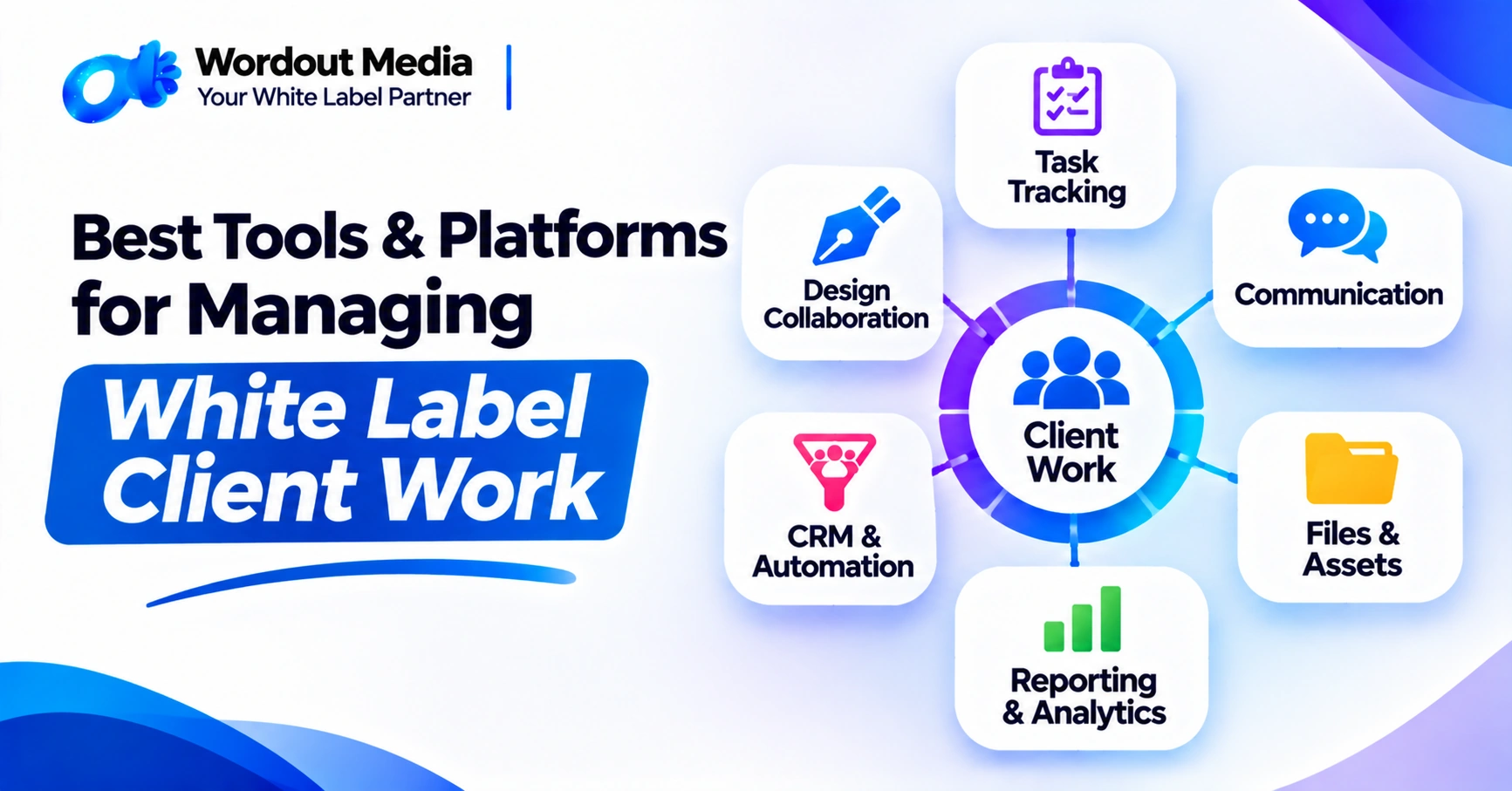
When you work with a white label partner, your tools need to handle six jobs.
- Task and project tracking: who’s doing what, by when
- Communication: questions, feedback and updates
- Files and assets: briefs, brand materials, deliverables
- Design collaboration: mockups, creative and approvals
- Reporting and data: analytics, dashboards and client reports
- CRM and automation: leads, pipelines and follow-up
Let’s look at each.
1. Task and Project Tracking Tools
The job: a single place where every piece of work lives, with an owner, a deadline and a status.
This is the backbone. Project management software, as a category, typically supports task assignment, collaboration, scheduling and reporting from a shared workspace.
What to look for:
- Easy task creation and clear assignment
- Due dates and statuses
- Comments on each task, so conversation stays attached to the work
- File attachments
- Guest or member access for partners
- Time or hours tracking, if you’ll be buying hours
Common examples: ClickUp, Asana, Trello, Monday.com, Notion and Basecamp are widely used. Many small agencies also run simple boards in spreadsheets.
How it works with us: you can send work through ClickUp or Asana, whichever you already use. We join your workspace as a member of your team, so you don’t have to learn a new system. In addition, every agency partner gets a shared task tracker that logs each task, who did it, how long it took and what was delivered, updated as work happens, not at month-end. Both sides can see the remaining balance of hours at any time.
Tip: One task, one owner, one due date. Tasks with vague ownership are the ones that slip.
2. Communication Tools
The job: fast, clear conversation without losing track of decisions.
What to look for:
- Separate channels or threads per client or project
- Easy search
- Notifications that don’t become noise
- The ability to include partners without exposing other clients
Common examples: Slack, Microsoft Teams, Google Chat and plain email. Video tools such as Google Meet, Zoom or Teams handle calls.
How it works with us: email and Slack are both accepted. We work EST hours, so North American agencies get real-time overlap, and European agencies get work started as their afternoon begins, with briefs usually returned the next morning.
Tips:
- Keep decisions in the task comments or a short written summary, not only in chat.
- Never add a client to a channel where a partner’s name or members are visible. See How to Keep White Label Work Invisible to Your Clients.
- Agree on response times so nobody feels ignored.
3. Files and Assets Tools
The job: a reliable home for briefs, brand guides, logins (securely) and finished deliverables.
What to look for:
- Shared folders with permissions
- Version history
- Easy link sharing from your account
- Neutral folder names
Common examples: Google Drive, Dropbox, OneDrive and Box.
Tips:
- Set up folders under your own accounts, with one folder per client.
- Use a consistent naming convention.
- Check file properties before sharing with clients.
- Store passwords in a password manager with sharing controls, never in documents or chat.
4. Design Collaboration Tools
The job: creating, reviewing and approving visual work without endless email attachments.
What to look for:
- Real-time collaboration
- Commenting directly on designs
- Shared libraries of brand assets
- Easy export
Common example: Figma is widely used for interface and graphic design. It’s also central to our Creative Design + Figma service.
Tips:
- Keep files in your workspace, or have them transferred to it, so team and project names don’t leak when you share.
- Use a brand library, so every design starts with the right fonts and colors.
- Agree on how approvals work: comments in the file or a short message.
5. Reporting and Data Tools
The job: turning analytics into reports clients can understand.
What to look for:
- Connections to the data sources you use
- Templates you can brand
- Easy sharing and scheduling
- Control over what clients can see
Common examples: Looker Studio, spreadsheets, presentation templates and a range of paid reporting platforms.
Looker Studio, for instance, can connect to Search Console and combine it with other sources such as Google Analytics and Google Ads, according to Google’s documentation. The same documentation notes that Search Console data has privacy-related limits, so it’s wise to understand the quirks of any data source you rely on.
For a full walkthrough of building client reports, see How to Build a White Label Reporting System Clients Trust.
6. CRM and Automation Tools
The job: tracking leads and customers, and automating follow-up.
Marketing automation software, as described in the Wikipedia article on the topic, helps automate repetitive tasks and manage work from one system, with typical functions including email and other multi-channel messaging, tracking, lead scoring, campaign management and reporting, and it often integrates with CRM software.
What to look for:
- Pipelines and contact management
- Email and text automation
- Booking and calendar features
- Integrations with your other tools
- Sensible permission controls
Common examples: HubSpot, GoHighLevel, Zoho, Pipedrive and many others.
How it works with us: our CRM setup service uses GoHighLevel, which we configure from scratch as a central place for leads, contacts and pipelines, and we build integrations and API connections between tools. See Automations + AI Workflows and our explainer on AI workflow outsourcing for agencies.
How to Choose Tools: Eight Questions
- Will my team actually use it? The best tool is the one that gets used.
- Can my partner join easily? Guest or member access without extra cost is a plus.
- Does it separate clients cleanly? You don’t want one client seeing another’s work.
- What can clients see? Check user lists, workspace names and shared links.
- Can I export my data? Avoid lock-in.
- What does it cost at my team size? Pricing often scales per user.
- Does it integrate with my other tools? Fewer manual steps means fewer mistakes.
- Is access control good enough? Permissions, two-factor authentication and the ability to remove users quickly.
Branding and Access: The Hidden Tool Problem
Tools are where white label arrangements most often leak. Before you give a partner access, check:
- Workspace names and logos. Do they show your agency?
- Invitation emails. Do they come from a neutral or branded address?
- User lists. Can clients see who has access? Use role-based addresses on your domain.
- Shared links. Are they under your accounts?
- Notifications. Do email notifications mention your partner’s name?
- Integrations. Do connected apps show partner names in client-visible places?
We work “in your systems, with your email addresses if you want them,” so you decide how much is visible. Deliverables and reports carry your logo, and your clients only ever see your agency.
A Simple Starter Stack
If you’re building from scratch, here’s a sensible, modest setup. You can swap any piece for something you already like.
| Job | Starter choice | Why |
|---|---|---|
| Tasks | ClickUp or Asana (or a simple board) | Partners can join; clear ownership |
| Communication | Email plus Slack or Teams | Fast questions, written decisions |
| Files | Google Drive or Dropbox | Shared folders under your account |
| Design | Figma | Real-time comments and shared libraries |
| Reporting | Looker Studio or a spreadsheet template | Branded and repeatable |
| CRM | GoHighLevel or your current CRM | Lead tracking and follow-up |
| Passwords | A password manager | Secure access sharing |
| Hours | Our shared task tracker | Where every hour went |
This stack may sound modest. That’s intentional. Add tools only when a real problem demands it.
What to Avoid
Too many tools. Every extra tool is another place information hides.
Tool-hopping. Switching every few months because a new one looks better.
Chat as the only record. Decisions disappear in long threads.
Shared logins. Passwords passed in messages are an access and security risk.
Letting a partner host client assets in their own accounts. It creates ownership and visibility problems.
Free trials you forget. Track subscriptions.
Overbuilding. A complicated system nobody understands is worse than a simple one that works.
Ignoring security. Use strong, unique passwords, two-factor authentication where available and least-privilege access.
How This Fits Hour-Based Outsourcing
If you buy hours from a partner, visibility is everything. You want to know what each hour produced. That’s why our shared task tracker records each task, who did it, how long it took and what was delivered. It makes it easy to compare your estimate with reality, spot tasks that cost more than expected and plan your next block.
Hours don’t expire, so there’s no pressure to rush spending. Pick Starter ($200 for 20 hours), Growth ($400 for 40) or Scale ($800 for 80), all at $10 an hour, and use the tracker to refine your estimates. Our guide to choosing a block explains how.
The Platforms Wordout Media Works With
Here’s a plain list of what we actually use or accept, based on how we work with agency partners.
- Task management: ClickUp or Asana, whichever you already use. We join your workspace.
- Communication: email and Slack.
- Hours and visibility: a shared task tracker for every agency.
- Design: Figma, as part of our design service.
- Websites: WordPress and Elementor builds.
- CRM and automation: GoHighLevel, plus integrations and API connections.
If you use something not on this list, ask. The most important question is whether we can work comfortably in your workspace, and the answer for most mainstream tools is usually yes. We’ll tell you plainly if not.
Where We Might Not Fit
- If your agency requires a tool we can’t access for security or compliance reasons.
- If you want a partner to manage your whole tool stack for you. We execute work; we don’t administer your software.
- If you need enterprise-grade security certifications as a condition of any vendor.
Frequently Asked Questions
What are the best tools for white label agencies?
A small stack covering task tracking, communication, files, design, reporting and a CRM. Common choices include ClickUp or Asana, Slack or email, Google Drive, Figma, Looker Studio and GoHighLevel.
Do I need special software to work with a white label partner?
No. You can usually keep your existing tools. At Wordout Media, we join your ClickUp or Asana workspace, and we also accept email and Slack.
What’s the best project management tool for agencies?
It’s the one your team will use consistently and your partner can join. ClickUp, Asana, Trello and others all work if you’re disciplined.
How do I track the hours I buy?
Our shared task tracker logs each task, who did it, how long it took and what was delivered, and shows the remaining balance.
How do I stop clients from seeing my partner in my tools?
Use role-based addresses on your domain, neutral workspace names, shared links from your accounts and check user lists and notifications before clients get access.
Which CRM do you use?
For CRM setup, we use GoHighLevel and can also build integrations between other tools.
Should I let my partner use their own accounts for client assets?
Avoid it. Client assets should live in your or the client’s accounts, so you keep ownership and control.
How many tools is too many?
If your team can’t say where a piece of information lives, you have too many. Start with the six jobs and add only when necessary.
The best tools for white label agencies aren’t the fanciest. They’re the ones that make delegation boring: a clear task, a clear owner, one place for files, a clean way to talk, a repeatable report and an honest record of hours. Pick a small stack, make sure your partner can join it, check what clients can see and review it once or twice a year.
If you’re not sure whether a partner would fit your setup, the simplest test is to send one real task and see how smoothly it moves.
See the Platforms Wordout Media Works With
Want to check we can work in your setup?
See the platforms Wordout Media works with in our FAQs, then claim your 8-hour free trial and send a task through your own workspace. No contract, no card, no sales call required first. You can also browse our services or learn more about us.